Learning words with Anki, a powerful flashcard study tool
For many players, learning words is a core part of the Scrabble tournament experience. There are tools from A to Z to help you build your vocabulary: Aerolith, Quackle, Xerafin, and Zyzzyva are some you may know about already.
We encourage players to try as many different study tools as they like to find a great fit for their own approach to learning. For the two of us, our tool of choice is Anki. For the benefit of players who may not already be familiar with Anki, today we'll share what we love about it.
Here's Jennifer's perspective:
I discovered Anki years ago while searching for a study app that could sync effortlessly between my computer and phone. I spend so much time at the computer for work that the last thing I want to do is spend more time typing and clicking to learn words. I first tried Karatasi, but the flashcard animations made me nauseous.
Anki brought the best of other study tools together for me. It has a desktop interface that allows for powerful deck-building and customization. The mobile app enables me to study on the go, particularly during those interstitial daily moments when I'm brushing my teeth or waiting for something.
What I find most powerful about Anki is its customization. I never liked that with Zyzzyva, your answer to an anagram is either right or wrong. It's very binary. It never made sense to me that after I'd solved an anagram nine times in a row, missing the anagram on the 10th attempt would bounce it back to cardbox zero, treating that rack the same as one that I had missed 10 times in a row.
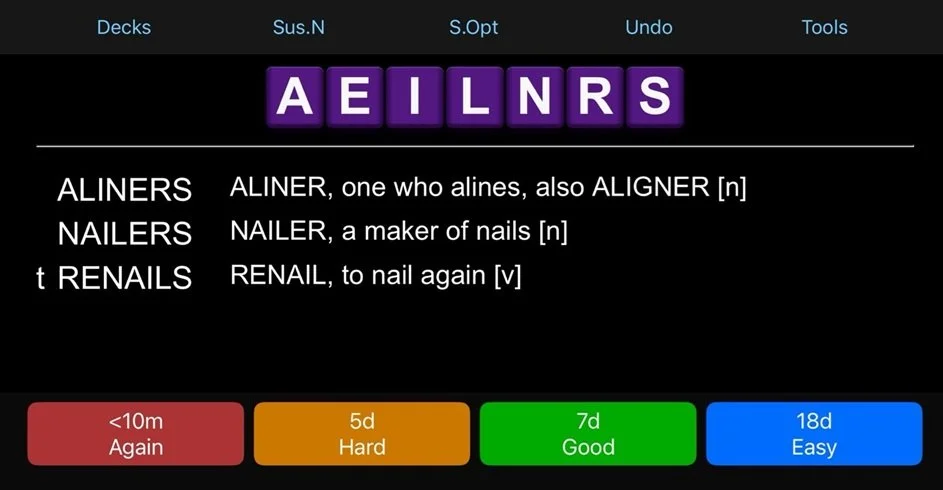
Anki's scheduler is smarter than that. It learns from your solving history and will schedule a card to reappear after you miss it, but at an interval that considers your prior responses. When you see an Anki flashcard, you can select from up to four options indicating how well you know the word. You can rate your confidence on a scale from "That's a word?" to "I kind of know it," to "I've got this! I'll find it every time."
Being able to gauge your confidence in an anagram and account with nuance for when you may know 90% of the answers in a rack versus none of them yields more precise results for word study. You can build out multiple decks and drill them as sets, or as one giant cardbox. Sometimes I'm in the mood to study sixes with power tiles, my favorite collection of words. Sometimes I study bingos. With Anki's decks, you can choose what you want to study with precision. That precision allows you to strengthen any weak points in your word knowledge in an efficient way.
I love that my mobile word study app now teaches me definitions. Words stick in my brain better when I know what they mean. Knowing definitions also helps me not conjugate trees as verbs. (I once played YEWED*.)
Anki allows you to easily suspend (meaning hide) cards you don't need to study. For example, if you're studying power fives and you're confident you'll always solve the alphagram EJLLY, then you can hide it. It’s a common word, easy to anagram, and takes no hooks. By removing things like JELLY from your deck, you can focus on learning the words you really need to study. Or you can leave all of them in. It's your choice.
Anki is highly visually customizable, and Nits in particular has done a lot to customize it. Thanks to Nits, my Anki cardbox now features tile images for the racks, with the CoCo's purple background as the tile color. I love how pretty and clean the tiles look. The visual presentation makes it easier for me to recognize racks and their anagrams quickly without having to write them out. I'm grateful for all that Nits has done to make Anki more accessible to others.
Here's Nits' perspective:
Anki was my favorite study tool while I was learning French, Classical Latin, and Ancient Greek vocab during my undergrad. It came in handy yet again when I had to memorize hundreds of artworks for my doctoral comprehensive exams. Eight months ago, I decided to mobilize it for Scrabble, and the results have been spectacular.
Why Anki, you might ask? There's three major reasons: It includes all the best features of our most commonly used study tools, its FSRS algorithm allows you to learn the most amount of words in the least amount of time, and it's incredibly customizable. Also, did I mention that it's free?
All the best parts in one
Anki includes everything you love about all the other leading word study platforms.
Zyzzyva: Like Zyzzyva, Anki lets you study offline, without an internet connection, on your desktop and phone, and lets you sync your progress across devices. As on Zyzzyva desktop, Anki allows you to search for hyperspecific queries. So, if you wanted to study the top 10,000 probable 7s that have two anagrams, are nouns, and only have 2 vowels, you could search for and study just that.
Xerafin: Like Xerafin, the Anki decks automatically show you words in exactly the order that you need to study them. Once you import the decks into your Anki account, you can immediately start solving. You never have to think about when to upload the next set of words or what to study next. Anki also has a web interface like Xerafin's, meaning you can study online even if you don't want to download an app.
WordVault: WordVault's FSRS algorithm was adopted from Anki. Anki allows you to store the entire lexicon on your account for free and it doesn't require internet access.
The FSRS algorithm
The Free Spaced Repetition Scheduler (FSRS) asks you to tell Anki how well you were able to remember a solution - Again if you got it wrong or couldn't remember at all, and Hard, Good, or Easy if you got it right.
With the FSRS, users have to do 20-30% fewer reviews than with other cardbox systems to achieve the same retention level.
The FSRS is also much better at scheduling cards at times when you haven't been able to use Anki in a while. You are not penalized for a backlog, and you no longer have to restart or reschedule your cardbox if you fall behind on reviews!
Anki's FSRS optimizer uses machine learning to learn your memory patterns and find parameters that best fit your review history.
The customizability
What do you want to study?
With Anki, you can choose to study exactly what you want, in exactly the order that you want. On any day, you could tackle your due cards by studying all 1-anagram words, all 5s, all vowel dumps, or all OUT- words first. You could study in order of ease and get through all the easy words first. You could study new words, or go through your reviews first, or have the new words be mixed in with reviews.
You can even control how many words you want to study today, every day, or by each deck, and set different review schedules for each day of the week (for example, you could have fewer cards due on Mondays).
If you’re ever stuck on an alphagram, Anki has shuffle and hint buttons to help you along.
And then there's the visual customizability. The letter tiles on your screen can be consonant-first, vowel-first, or alphabetized. They look like real-world Scrabble tiles, and your pattern recognition will be faster over the board as a result. There are all sorts of other optional features - lexicon symbols (even within definitions), Zyzzyva-style formatting for answers, and even color coding for answers by anagram count. You can use the Anki UI to customize fonts, colors, highlights, and more!
If you'd like to give Anki a try, you can download commonly requested Anki word decks here. If you'd like to build your own custom decks, check out Nits' Anki Deck Builder.
Beyond Anki, you can find links to many other learning resources on our Learning Tools page. If you have a favorite study tool you'd like to tell us about, we'd love to hear it.